Bracket Orders and OCO: Set Your Stop and Target Together
How bracket orders and OCO work, why they keep your plan intact and the mistakes to avoid, like orphan orders.
On this page
The short answer: A bracket order is an entry order with a stop loss and a profit target attached. The stop and target are linked as OCO, "one cancels the other": when one fills, the platform cancels the other automatically. Brackets let you decide your exit before you enter, which takes the in-the-moment decision away and keeps a forgotten order from opening a new position by accident.
Key takeaways
- Bracket = entry + stop + target, placed together.
- OCO means when the stop or target fills, the other is cancelled.
- It sets your risk and reward before emotions get involved.
- Most futures platforms support brackets, often as saved templates.
- Always confirm the bracket attached after your entry fills.
How does a bracket order work?
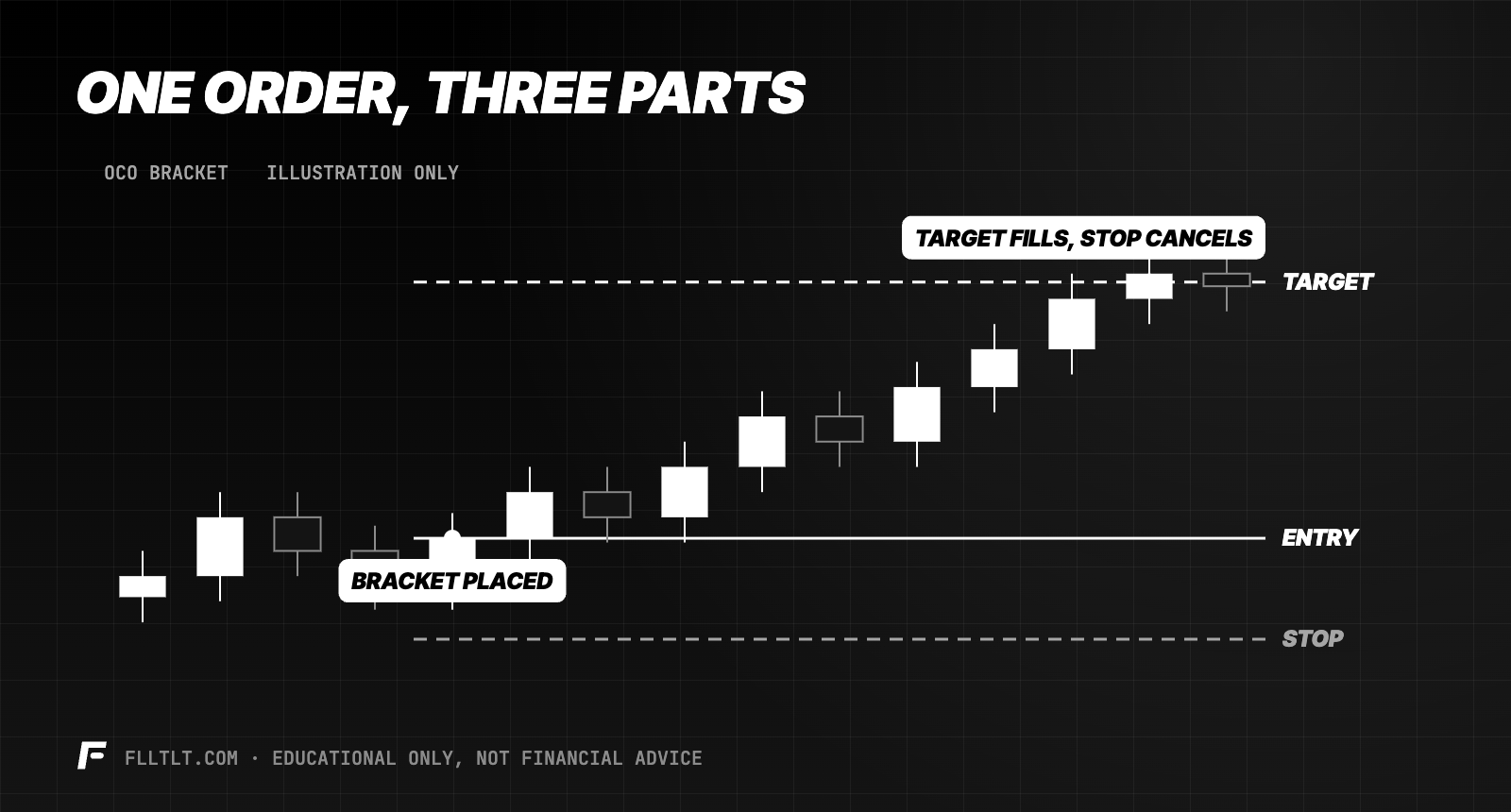
- You enter with a market or limit order.
- Two exit orders attach: a stop below (for a long) and a limit target above.
- Price hits one of them. That order fills and closes the trade.
- The other cancels. No leftover order sitting in the market.
Why use bracket orders?
- Risk is set before entry. You know exactly what the trade can lose.
- Fewer emotional decisions. No moving the stop, no grabbing profit early out of fear. See trading on tilt.
- Protection if something breaks. If your internet drops, the stop is already working at the broker or platform.
- Consistency. A saved template means the same stop and target distance every time.
What can go wrong?
- The bracket didn't attach. Some platforms only attach a bracket when using a template or a specific order button. Check after every entry.
- Orphan orders. If you close a trade manually without the platform cancelling the exits, a leftover order can open a new position. Use flatten or "cancel all" when you exit by hand.
- Fixed brackets on every chart. A 10-point stop on a quiet day and a wild day aren't the same. Adjust to the chart, then size to fit.
From the desk Indy trades MNQ and records results in points on Day Trader Income. Points-based brackets make it simple: the stop and target are set in points from the chart, and the platform handles the rest.
The bottom line
A bracket order is the easiest way to make a plan stick: entry, stop and target, set together, with the exit you don't need cancelled automatically. Practice placing and checking them on a simulator until it's automatic.
FAQ
What is a bracket order?
A bracket order is an entry order with a stop loss and a profit target attached. When one exit fills, the other is cancelled.
What does OCO mean?
OCO stands for one cancels the other. When one of two linked orders fills, the platform automatically cancels the other.
Why should day traders use bracket orders?
They set risk and reward before entry, reduce emotional decisions and keep a stop working even if your connection drops.
What is an orphan order?
A leftover stop or target that was not cancelled after a trade closed. It can accidentally open a new position if price reaches it.